nomad logo NOMAD
Open source · FAIR data
Control instruments, run protocols,
record FAIR data.
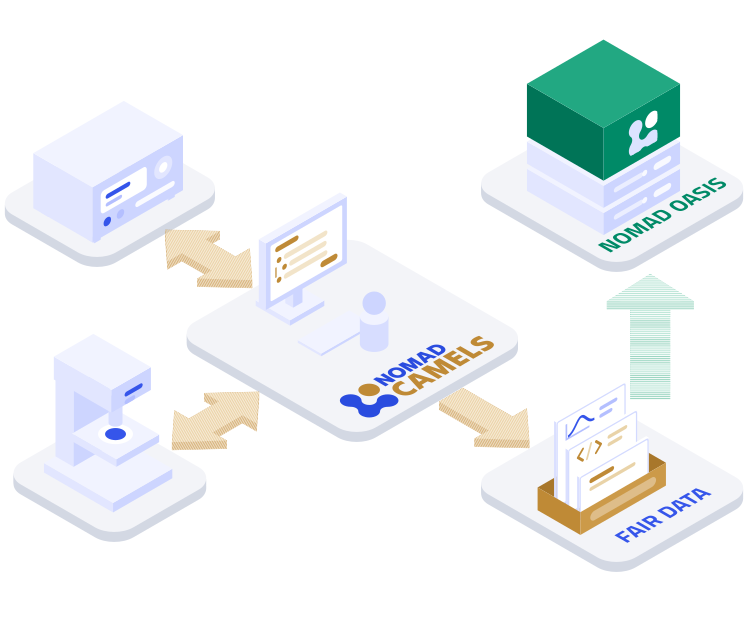
NOMAD CAMELS lets you turn research ideas into measurement and process protocols in minutes. Implement instrument communication without programming skills, increase productivity and flexibility, and produce FAIR data.
NOMAD CAMELS interface preview
What is NOMAD CAMELS?
NOMAD CAMELS is a standalone open-source measurement software targeted towards the requirements of experimental physics. Ease of use, rich metadata, and FAIR-compliant data are at the heart of CAMELS design. It is suited for any researcher wanting full control and full documentation of experiments without the need of programming skills.
Smooth installation

CAMELS is a Python package distributed via PyPI. It installs easily on any computer, and on Windows the installer does all the work for you.

Easy to use

No programming skills required. Configure your measurement and process protocols, and get it done within minutes.

FAIR data

Automatically store FAIR data with rich metadata so you and others can understand your experiment in detail. Optionally connect directly to your NOMAD Oasis.

Flexible and extendable

Add further instruments to your setup at will. Reuse and adapt existing measurements quickly.

Scalable

Work with small setups using directly connected instruments, or connect to large distributed systems using advanced protocols like EPICS.

Community driven

Contribute to CAMELS and add new instruments on GitHub. CAMELS comes with an instrument driver wizard that helps you implement new instruments.

Who builds it
Developed by FAIRmat

Join the FAIRmat consortium and revolutionize the way research data is managed by embracing FAIR data. FAIRmat develops and operates NOMAD to build a federated data infrastructure for materials science.

FAIRmat website →
Why use NOMAD CAMELS?
CAMELS allows you to define measurement protocols and instrument control using a graphical user interface with just a few mouse clicks while you do not need to care about device communication. CAMELS does.
Graphical user interface

Define your measurement and process protocols with a few clicks.

  • Easily add and remove instruments
  • Design measurement and process protocols
  • Run experiments
  • Automatically get comprehensive documentation
Instrument control

Let CAMELS take care of instrument communication.

  • Community-developed instrument drivers
  • Local communication via any interface
  • Connect existing infrastructure via EPICS
  • Build your own drivers with built-in assistants
FAIR data

Let CAMELS automatically store all available data and metadata.

  • Measurement data and timestamps
  • Instruments and settings
  • Human-readable summary
  • Python code that runs the protocol
Need more privacy or resources?
Create a NOMAD Oasis and run your own NOMAD

Use your own resources, your own rules, your own extensions. Manage all your group's data.

How to run NOMAD CAMELS
CAMELS is distributed via PyPI and can run on any computer that supports Python. There is a special installer for Windows. See our installation guide in the documentation.
01
CAMELS software

CAMELS requires a desktop computer running Windows, Linux/UNIX, or macOS. The required Python environment is installed either through the installer on Windows or manually via the installation guide.

02
Drivers

Once installed, CAMELS lets you install instrument drivers from PyPI via the graphical user interface. You can also create and run local self-developed instrument drivers.

Developed at FAU

Developed at the Friedrich-Alexander-Universitat Erlangen-Nurnberg with FAIR data practices and open-source approach in mind.

Chair of Applied Physics →
NOMAD CAMELS is open source
CAMELS is an open-source project. We are happy for feedback, suggestions, discussions, and for contributions to further developments of CAMELS' graphical user interface and instrument drivers.
GNU LGPL 2.1

A permissive license so that you can use CAMELS everywhere and for all purposes.

Discuss

Openly discuss issues and opportunities and help shape future CAMELS development on GitHub.

Contribute

Develop and share new instrument drivers or contribute bugfixes, features and extensions through standard open-source workflows on GitHub.